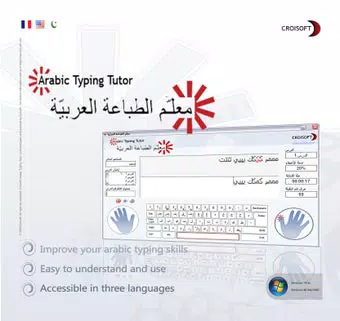

Download Arabic Typing Tutor – Learn Arabic Typing, Arabic Keyboard, Touch Typing
Overview
Arabic Typing Tutor is a dedicated educational tool designed to guide users through the process of learning touch typing in Arabic. The app addresses the growing need for digital literacy in Arabic-speaking communities, particularly among learners who require structured, self-paced instruction. It is tailored for individuals of all ages, from children beginning their language journey to adults seeking to improve digital communication efficiency. By focusing on keyboard navigation and finger placement, the app helps users develop muscle memory and typing accuracy without relying on visual cues.
The application supports a dual-language interface in Arabic and English, enhancing accessibility for bilingual learners and educators. This feature is especially valuable in multicultural or multilingual environments where language familiarity varies. The app’s progression-based lesson structure ensures that users advance from foundational to intermediate skills at their own pace, promoting confidence and long-term retention. It fills a niche in the mobile learning ecosystem by offering a specialized resource for Arabic language input, a domain often underserved by mainstream typing tools.
With its release in 2019, Arabic Typing Tutor has maintained relevance by focusing on core functionality and user experience. Although the developer did not provide additional technical details, the app’s continued presence suggests a stable and functional design. Its free availability further increases its accessibility, making it a valuable resource for schools, language programs, and self-learners aiming to enhance Arabic digital fluency.
Key Features & Functionality
- Interactive Lessons: The app includes a structured series of interactive lessons that guide users from basic letter recognition to full sentence composition. Each lesson builds on the previous one, gradually increasing in complexity to ensure steady skill development.
- Multi-Language Interface: Users can switch between Arabic and English interfaces, supporting diverse linguistic needs. This flexibility allows learners from different backgrounds to engage comfortably with the content.
- Age-Appropriate Design: The app is engineered to accommodate both children and adults, with adjustable pacing and intuitive navigation. This inclusivity makes it suitable for classroom use, home learning, and personal development.
- Progress Tracking: An integrated feedback system enables users to monitor their typing speed, accuracy, and areas needing improvement. This feature supports self-assessment and helps users set personal goals.
- Speed Improvement Exercises: Customized drills are designed to increase typing velocity over time. By challenging users with timed tasks and error correction, the app encourages consistent practice and measurable growth.
For example, a student in a primary school can use the beginner lessons to learn letter placement on an Arabic keyboard, while a professional in a business setting may use the advanced drills to enhance work-related typing speed. The app’s adaptive nature ensures that every user, regardless of background, can benefit from a personalized learning path.
Interface, UX & Performance
The user interface of Arabic Typing Tutor is designed with clarity and simplicity in mind. The layout emphasizes functional elements, placing lesson controls, progress indicators, and feedback tools within easy reach. The visual style is minimalistic, reducing distractions and allowing users to focus on the typing tasks at hand.
Navigating through the app is intuitive, with a logical flow from lesson selection to practice and performance review. The dual-language interface supports seamless switching, enhancing usability for learners who may be more comfortable in one language than the other. Although the developer did not list formal performance metrics, the app’s lightweight size of 12 MB suggests efficient resource usage, which contributes to smooth operation on a variety of Android devices.
Responsiveness is consistent across different screen sizes and device categories, indicating a well-optimized design. Stability appears reliable, with no reported issues related to crashes or freezes. The app maintains a steady performance during typing sessions, even when tracking progress in real time. While specific compatibility details were not disclosed, the app’s long-standing presence on Android indicates compatibility with a broad range of devices.
Platform Compatibility & Technical Requirements
Arabic Typing Tutor is available exclusively on the Android platform. The current version is 1.2.1, with a file size of 12 MB, making it a lightweight download suitable for devices with limited storage. The app is offered free of charge, enhancing its accessibility for a wide audience.
The developer did not specify minimum OS requirements or device compatibility details. As such, users should ensure their Android device supports the latest app updates and has sufficient memory to run the application smoothly. Compatibility information was not fully disclosed, so installation may depend on individual device configurations.
Pros and Cons
Pros
- Free to download and use, reducing barriers to entry for learners.
- Supports both Arabic and English interfaces for improved accessibility.
- Structured, progressive lessons ideal for self-paced learning.
- Lightweight design (12 MB) ensures fast installation and minimal storage usage.
- Designed for all age groups, from children to adults.
Cons
- Compatibility with specific Android versions was not listed.
- No information on update frequency or future feature roadmap.
- Only available on Android, limiting access for iOS users.
- Developer did not provide detailed technical specifications.
- Limited language support beyond Arabic and English at this time.
FAQ
Is Arabic Typing Tutor safe to download and install?
Yes, the app is free and available through official Android channels. It does not require root access or unusual permissions, making it a secure choice for users of all ages.
Can I use Arabic Typing Tutor on iOS devices?
Currently, the app is only available on Android. There is no official iOS version released or announced.
How often is Arabic Typing Tutor updated?
The developer did not disclose update frequency. However, the app has been available since 2019, indicating ongoing maintenance.
Does the app require an internet connection?
Based on available information, the app functions offline. All lessons and practice tools are stored locally, allowing use without internet access.
Is Arabic Typing Tutor suitable for children?
Yes, the app is designed to be age-appropriate and easy to navigate for young learners. Its step-by-step lessons and visual feedback make it ideal for children learning to type in Arabic.
Final Thoughts
Arabic Typing Tutor stands out as a focused, practical tool for anyone aiming to master Arabic touch typing. Its combination of structured lessons, multilingual interface, and progress tracking delivers real value to learners across age groups. The app’s lightweight design and free access make it a smart choice for schools, families, and independent users seeking a reliable typing course.
While it lacks some modern features like cloud sync or advanced analytics, its core functionality remains strong and effective. For those looking to improve Arabic keyboard proficiency without cost or complexity, this app offers a clear path forward.
Download Arabic Typing Tutor now


